
How to Customize One Post for Every Platform (Without Rewriting It Five Times)
To customize one post for every platform without rewriting it five times, write a single strong base caption, then use the per-platform caption fields in a scheduler like Socialic to change only what each network actually needs: the first line, the length, the number of hashtags, the formatting, and the platform-specific fields like a YouTube title or a Pinterest board. Your media stays attached once. Each platform gets its own version in about a minute.There are two slow ways to run a multi-platform post, and both are avoidable. The first is blunt cross-posting: paste the same caption everywhere and hit schedule. It is fast, but it hits Threads’ 500-character wall, buries your hook under a block of Instagram hashtags on LinkedIn, and reads as automated to the small slice of your audience that follows you in more than one place. The second is a full rewrite for every platform from a blank box, which is genuinely 20 to 30 minutes per post and the reason most people quit posting to five networks.The middle path is adaptation, not authorship. The idea is already done. You are only translating it into the shape each feed expects. This guide walks through where that happens in Socialic, the one-caption-then-adjust workflow, exactly what to change for each platform, and a 60-second checklist you can reuse on every post.What “Customizing Per Platform” Actually Means
Customizing a post per platform means keeping the core message identical and changing only the wrapper around it. You are not inventing a new idea seven times. You are adjusting five things so the same idea lands natively in each feed.The first line. Every platform truncates the caption after one or two lines before a “more” link. That first line is the whole hook. A question that works on Threads is not the same opener that works on LinkedIn.
The length. A LinkedIn post can breathe for 3 or 4 short paragraphs. A Threads post has to make its point in a sentence or two. Same idea, different word count.
The hashtags. Three to five focused tags on LinkedIn and Instagram, keyword-style phrases on TikTok, none on Threads or Facebook. The set is different every time.
The formatting. Line breaks and white space help on LinkedIn and Facebook. Instagram and TikTok captions are tighter. Pinterest wants a plain, descriptive sentence.
The platform fields. YouTube needs a title, TikTok needs a disclosure setting, Pinterest needs a board and a destination link. These are not caption edits, but they are part of making one post fit every platform.
Where Per-Platform Customization Happens in Socialic
Open the Content Creator from the left menu and select the channels you want this post to go to. As soon as you pick more than one channel, Socialic adds a Customize For Each Platform step. If you only select one channel, it skips straight to a single composer.
Inside that step you get a shared caption field at the top plus a separate section for each platform you selected. Each platform section has its own caption field and its own set of network-specific fields. Your media upload sits above all of it and applies to every platform at once.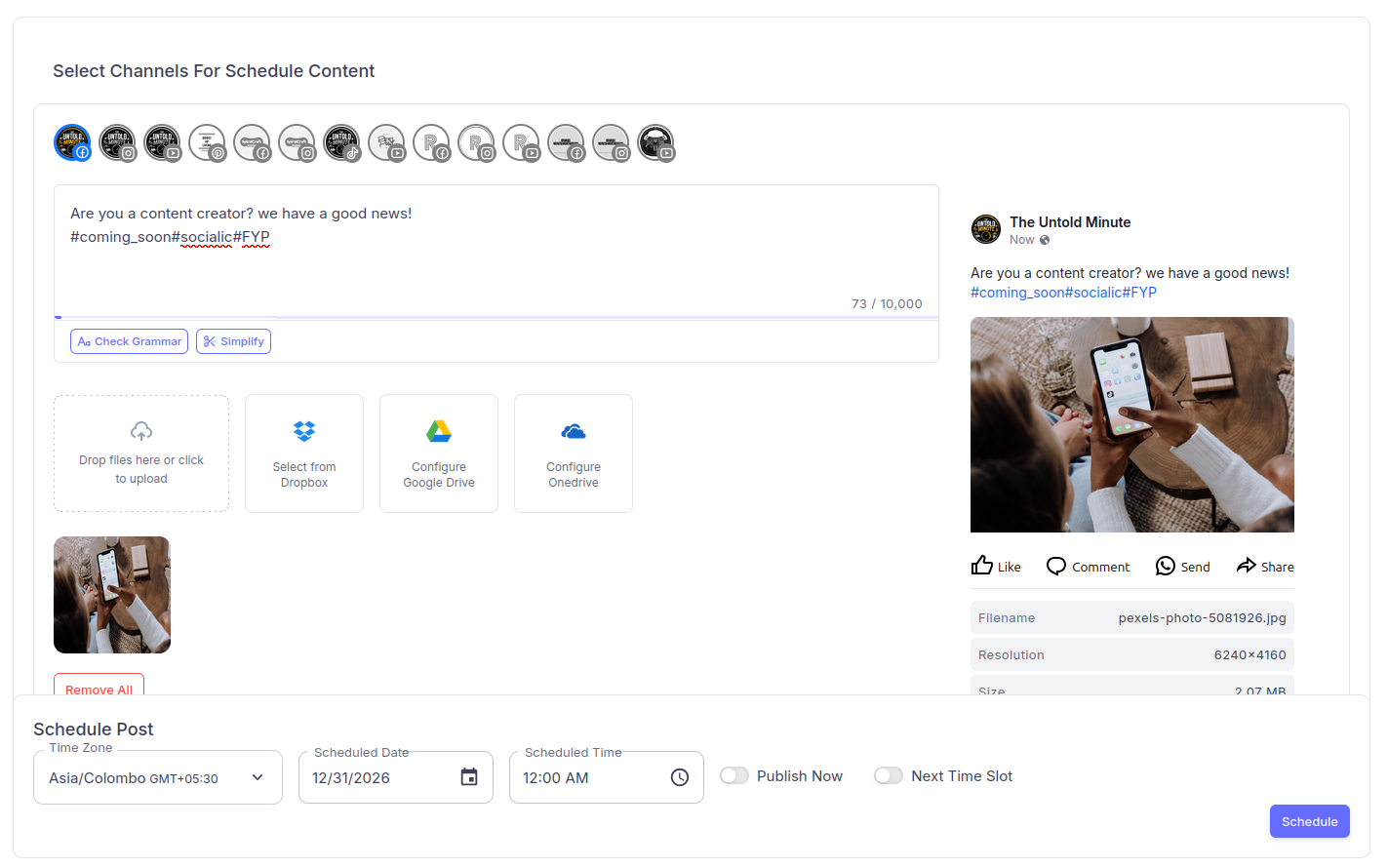
The Content Creator: channels along the top, the caption field with its live character counter, media attached once, and a live preview on the right. With more than one channel selected, each gets its own caption and fields.
The character counter is the guardrail. Each field shows how many characters you have left and blocks you from going over that network’s ceiling. When you type in the shared field with several platforms selected, Socialic holds you to the most restrictive limit in your selection, so a caption that fits the shared field will fit everywhere. Anything longer goes in the individual platform field instead.
- Facebook: 10,000 characters
- YouTube: 5,000 characters (description)
- LinkedIn: 3,000 characters
- Instagram: 2,200 characters
- TikTok: 2,200 characters
- Threads: 500 characters
- Pinterest: 500 characters (description)
The One-Caption-Then-Adjust Workflow
This is the sequence that keeps a five-platform post under ten minutes.
- Write the base caption in the shared field
Write the version you would post if you could only post once. Get the idea, the hook, and the call to action right here. Do not add hashtags yet. Because the shared field enforces the strictest limit in your selection, if this reads well inside that constraint you have a caption that works everywhere as a fallback.
- Start from your “money” platform
Pick the one platform that matters most for this specific post and write its version first, at full length, in its own field. If it is a professional insight, that is LinkedIn. If it is a visual, that is Instagram. This becomes your longest, most complete version and every other platform is a trim of it.
- Adapt down for the shorter platforms
Copy that version into the next platform’s field and cut it to fit: shorten the intro, keep one strong line, drop or swap the hashtags. Threads and Pinterest are the tightest, so do those last and be ruthless. You are not writing anything new, only removing.
- Fill in the platform fields
Add the YouTube title, the Pinterest board and link, the TikTok settings. These take 30 seconds each and are covered per platform below.
- Check the live preview for each platform
The preview panel shows how the post renders on each network, including where the caption cuts off. If your hook disappears behind the “more” link, move it up. This is the 20-second check that catches most problems before they publish.What to Change for Each Platform
Use this as the reference while you fill in each platform’s section. The pattern is always the same: adjust the hook, the length, the hashtags, the formatting, then the fields.- Hook: a statement or a result, not a question. The first two lines show before “more”.
- Length: long is fine. Three to five short paragraphs with line breaks between them.
- Hashtags: three to five, at the very end.
- Formatting: one idea per line, generous white space, no wall of text.
- Fields: caption only.
- Hook: conversational, first line does the work.
- Length: medium. Shorter than LinkedIn, longer than Instagram. The 10,000-character limit is not a target.
- Hashtags: none, or one or two. They do little on Facebook.
- Formatting: short paragraphs, a link in the first comment rather than the caption if reach matters.
- Fields: confirm Post or Reel (auto-detected from your media); for a Reel, pick a cover frame or upload a 9:16 cover.
- Hook: the first line before “more” has to earn the tap. Front-load it.
- Length: short to medium. One tight paragraph plus a call to action.
- Hashtags: a focused set of relevant tags, placed at the end or in the first comment.
- Formatting: line breaks between the hook, the body, and the call to action.
- Fields: confirm Post or Reel; a single video is treated as a Reel, images as a Post. Set a Reel cover frame.
TikTok
- Hook: the caption supports the video, it does not carry it. Keep it to a line.
- Length: short. A sentence, plus a few keyword phrases people might search.
- Hashtags: keyword-style and topical, not a huge pile.
- Fields: who can view, allow comment / duet / stitch, commercial content disclosure (turn on for anything promotional, choose Your brand, Branded content, or both), and video cover (drag the scrubber, then click Set as cover, or it will not save).
Threads
- Hook: the whole post is basically the hook. 500 characters total.
- Length: one or two sentences. This is where your sharpest one-liner version lives.
- Hashtags: none, or one.
- Formatting: plain and conversational, like a text message.
- Fields: caption only.
- Description: a plain, keyword-rich sentence describing what the pin is and who it helps. 500 characters.
- Hashtags: a few descriptive ones, optional.
- Fields: board (choose one, or type a new name and press + to create it), topic (the pin title, up to 100 characters), and a destination link starting with http:// or https://.
YouTube
- Description: the caption becomes the description. First two lines matter for search, so lead with what the video covers. Up to 5,000 characters.
- Fields: title (up to 200 characters, publishing without one limits reach), category and tags, visibility (Public, Private, Unlisted), and an optional custom thumbnail (up to 2MB, roughly 16:9).
What You Attach Once, and What Is Per Platform
The point of customizing in one composer is that the heavy things are shared and only the small things are per platform.Attached once: your image or video. Upload from your device, pick from the File Manager, or pull from Google Drive, OneDrive, or Dropbox. It applies to every selected platform, so there is no re-uploading per network.
Per platform: the caption, the hashtags, and the network fields above, plus covers. A YouTube thumbnail, a TikTok video cover, and a Facebook or Instagram Reel cover are each set in that platform’s own section.
Per platform, automatically: the Post vs Reel decision for Facebook and Instagram, based on your media. A lone video is a Reel; images or a mixed set is a Post. You can see and confirm it in each section.
A 60-Second Per-Platform Checklist
Run this on each platform section before you schedule.- Is the hook in the first line? Check the preview for where the caption cuts off.
- Is the length right for this feed? Long for LinkedIn, tight for Threads and TikTok.
- Are the hashtags this platform’s set, not a leftover Instagram block on LinkedIn?
- Are the required fields filled? YouTube title, Pinterest board and link, TikTok disclosure if promotional.
- Is the cover set where the platform uses one, and did you click Set as cover on TikTok?
- Any red validation warnings? Resolve them now, not after a failed publish.
Common Mistakes to Avoid
Leaving every per-platform field identical
If all seven sections have the same text, you have done cross-posting with extra steps. The fields exist to be changed. Even 60 seconds of trimming per platform beats posting the same block everywhere.Writing the shortest version first
If you start with the Threads version, expanding it for LinkedIn means writing new material. Start long, on your most important platform, and cut down. Removing is faster than adding.Pasting one hashtag set into all fields
A 20-hashtag Instagram tail on a LinkedIn post looks like spam and flattens reach. Match the hashtag count and style to each network, or drop them entirely on Facebook and Threads.Skipping the YouTube title or the Pinterest link
These are not optional in practice. A YouTube upload with no title barely gets served, and a Pinterest pin with no destination link wastes the click. Socialic warns you, but it is easy to click past the warning.Publishing all versions at the same minute
Customizing the caption but firing every platform at once still looks automated to anyone who follows you twice. With more than one channel selected you can set a different time per platform. Stagger them across the week. Our guides on the best time to post on Instagram, TikTok, and LinkedIn cover the timing.Final Thought
Customizing one post for every platform is a translation job, not a writing job. You do the thinking once in the base caption, pick the platform that matters most and write its full version, then trim that down for the shorter feeds and fill in the handful of fields each network needs. The character counter keeps you inside the limits, the preview shows you where the hook lands, and the media is attached a single time.One idea. Seven native versions. About a minute of work per platform.Try Socialic free
and tailor your next post for every platform in one sitting.
Frequently Asked Questions
Do I have to write a different caption for every platform?
No, but you should adjust one. Socialic gives you a shared caption field plus a separate field per platform — write one strong base caption, then tweak each platform’s field for length, first line, hashtags, and formatting. That’s one to two minutes per platform, not a full rewrite.How is customizing per platform different from just cross-posting the same text?
Cross-posting drops identical text everywhere, so it hits Threads’ 500-character limit, buries the hook under hashtags on LinkedIn, and reads as a bot to anyone who follows you in two places. Customizing keeps the core idea and changes the wrapper: hook, length, tone, hashtag count, and line breaks. Same message, native to each feed.Will Socialic stop me from exceeding a platform’s character limit?
Yes. Every caption field has a live counter and blocks you from going over that network’s ceiling. When you type in the shared field with several platforms selected, Socialic holds you to the most restrictive limit in your selection so nothing gets silently cut later. For a longer platform-specific version, use that platform’s own field.Can I use different hashtags or mentions for each platform?
Yes. Each per-platform caption field is independent free text, so you can put 3 to 5 hashtags on LinkedIn, a larger set on Instagram, keyword-style tags on TikTok, and none on Threads. Mentions work the same way, since handles differ per network anyway.Can each platform have a different cover or thumbnail?
Yes. You attach your main media once and it applies everywhere, but covers are per platform: a custom YouTube thumbnail, a TikTok video cover, and a Facebook or Instagram Reel cover frame are each set in that platform’s own section of the composer.Keep Reading
This is the execution side of multi-platform posting. For the full scheduling flow around it, from connecting accounts to confirming a post in your calendar, read
how to schedule posts to every platform at once
.
For the strategy layer, choosing the core idea and deciding what format it takes on each network, read
how to repurpose one piece of content across 6 platforms
and pair it with
how to batch create a month of social media content in one day
.