
How to Schedule YouTube, TikTok, Pinterest, and LinkedIn Posts with Socialic MCP
Socialic MCP handles YouTube, TikTok, Pinterest, and LinkedIn the same way it handles Facebook, Instagram, and Threads — list your channels, check what’s required, ask for anything missing, then schedule. The difference is what “anything missing” usually means. Facebook, Instagram, and Threads mostly just argue about media. These four each add a field the Meta group never asks for at all.
This guide covers what each platform specifically demands, and what it actually looks like when Claude catches a missing field before anything gets submitted — not after.
Why These Four Are Grouped Here
Not because they connect the same way — they don’t. Facebook, Instagram, and Threads share a connection flow because they’re all Meta platforms (see scheduling a Meta post with Socialic MCP for that guide). YouTube, TikTok, Pinterest, and LinkedIn connect independently of each other and of Meta. What groups them here is a different pattern: three of the four have a required field with no default, and Socialic MCP enforces it the same way the dashboard does — reject first, ask second, never guess.
Before You Start
At least one of the four connected in Socialic. This works the same with just one connected as it does with all four.
Socialic MCP connected to Claude, ChatGPT, or Codex. See how to connect Socialic MCP if you haven’t yet.
Media ready for YouTube, TikTok, or Pinterest. All three require it on every post — either a public https link, or something already sitting in your Socialic media library.
Where Each Platform Is Strict
YouTube — media, category, and visibility all required. Exactly one video, no images. A category (Howto & Style, Education, Entertainment, and so on) and a visibility (PUBLIC, UNLISTED, or PRIVATE) are mandatory on every request — there’s no default for either.
TikTok — media and privacy level required. One video, or 1–5 images (never mixed). The privacy level has to be one your account is actually allowed to use — Socialic MCP won’t accept one it isn’t. Promotional content also needs a commercial-content disclosure.
Pinterest — media and a board required. One image or one video, plus a specific board — there’s no “default board” to fall back on.
LinkedIn — the relaxed one. Media is optional, up to 9 images or videos. No required category, privacy level, or board. Closer to how Facebook behaves than to the other three in this group.
Step 1: List What’s Connected
Start with “list my YouTube, TikTok, Pinterest, and LinkedIn channels” — or just whichever you’ve actually connected. This calls socialic_list_channels, and it returns exactly this kind of per-channel detail: whether media is required, what privacy levels an account allows, and whether a required field like a board is even in place yet. Here’s a real account, with Pinterest, TikTok, and YouTube connected (no LinkedIn yet):
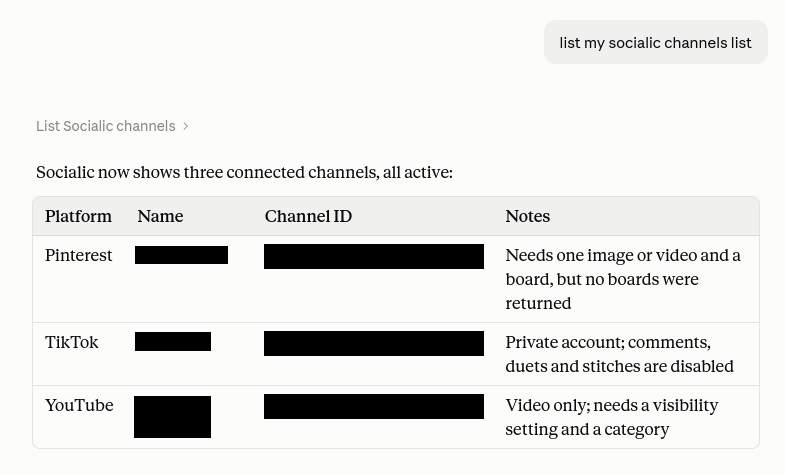
Real account, real gap: Pinterest needs a board, and this account didn’t have one yet.
Worth checking your media library at the same time, since YouTube, TikTok, and Pinterest all require it on every post:
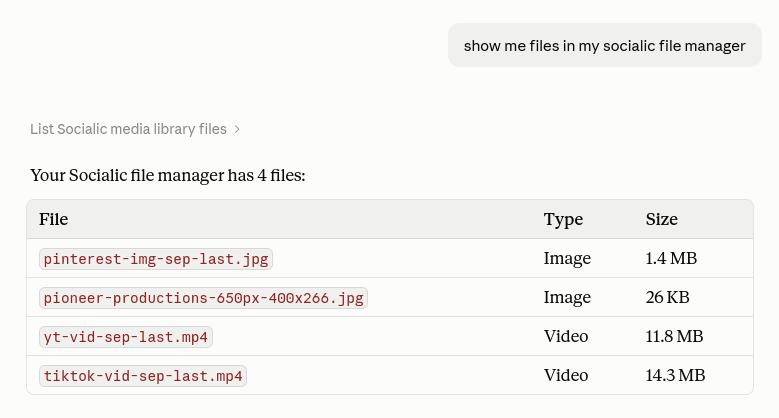
The same files referenced by name in every example below — no re-upload needed.
YouTube: Category and Visibility, Every Time
YouTube is the strictest platform Socialic MCP handles. A category and a visibility are required on every single request — leave either one out and nothing gets submitted; Claude will list the valid categories and the three visibility options (PUBLIC, UNLISTED, PRIVATE) and ask before trying again. Include both in the first message instead, and it’s one round trip:
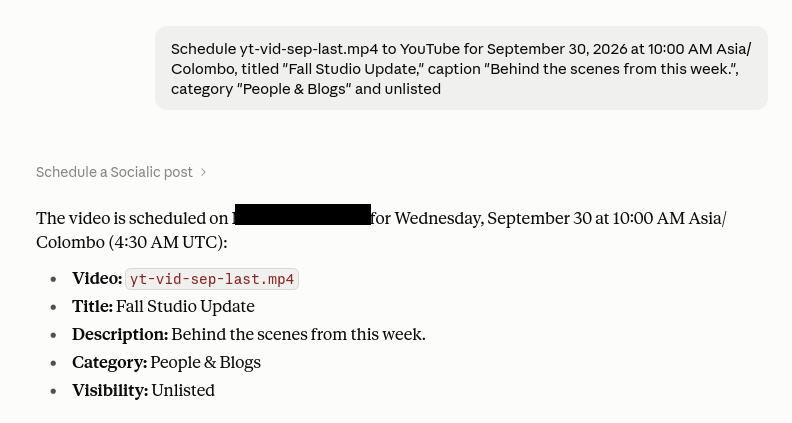
Category and visibility included upfront — one request, no follow-up question needed.
A custom thumbnail works the same way here as anywhere else Socialic MCP handles video — either a separate image, or a timestamp partway into the video to use as the cover frame instead of YouTube’s auto-generated one.
TikTok: Privacy Levels and Commercial Disclosure
TikTok’s required field is a privacy level — but which levels are even valid depends on your account, not on Socialic MCP. Ask for one your account doesn’t support (say, “followers only” on an account that doesn’t offer it) and the rejection names exactly what’s actually allowed instead. Name a valid one upfront and it’s a single request, as it was here on a real, private TikTok account:
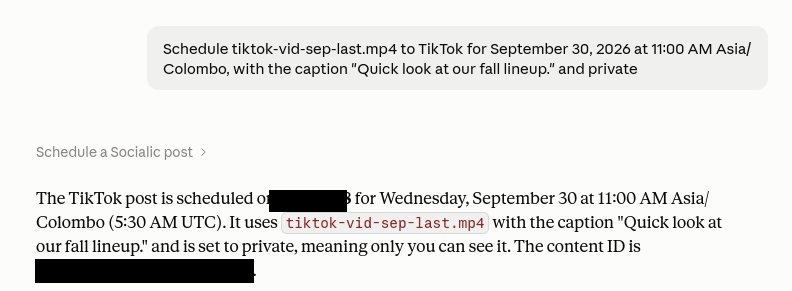
Private account, private post — and since the account is private, TikTok also disables comments, duets, and stitches on it automatically.
That last detail isn’t something you configure — it’s TikTok’s own account-level restriction, and Socialic MCP just reports it back rather than pretending those toggles are available when they aren’t.
If a post is promotional — yours or someone else’s — TikTok requires that to be disclosed. Socialic MCP models this as a commercialContent flag with two sub-flags, yourBrand and brandedContent, and it isn’t optional once you say the content is promotional. Mention that a post is promoting your own brand, and Claude sets commercialContent: true with yourBrand: true — TikTok then shows the standard “Promotional content” label on the post.
Pinterest: A Board, Every Time
Pinterest’s one non-negotiable field is a board — there’s no default, and no “unsorted pins” fallback through the API. Leave it out and the pattern is identical to YouTube’s category or TikTok’s privacy level: rejected first, with the specific missing field named, not a generic error.
What’s different about Pinterest is that the board itself has to exist first — Socialic MCP won’t create one for you. On the real account from Step 1, no boards existed yet at all, so the next move was creating one directly in Pinterest, then asking Claude to check again:
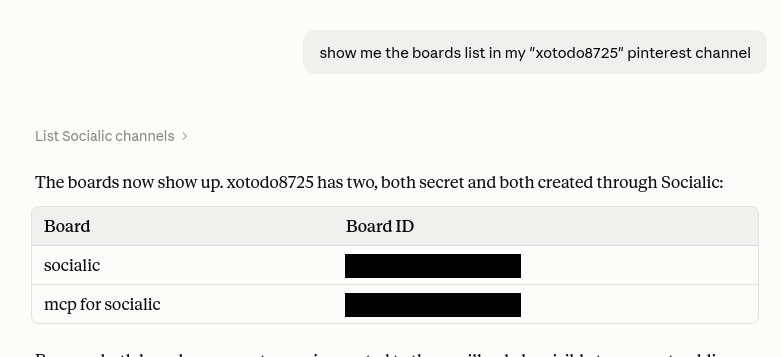
Once a board exists on Pinterest, Socialic MCP can see it immediately — no reconnection needed.
With a real board name in hand, scheduling the pin is a single round trip:
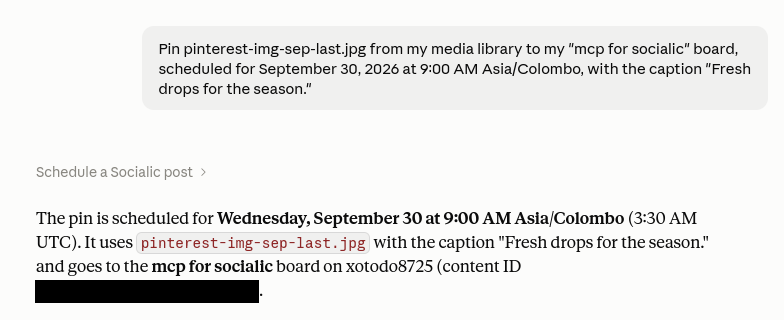
Same pattern as YouTube and TikTok — name the required field, and it’s one request.
LinkedIn: The Relaxed One
LinkedIn doesn’t add a required field at all — media is optional, up to 9 images or videos, and there’s nothing to fill in beyond the caption and channel. Post a caption with no media at all and it goes straight through, no follow-up questions — the closest thing to Facebook’s flexibility in this group.
Asking for More Than One at Once
Nothing stops you from including two or more of these in the same request — each channel in socialic_schedule_post carries its own settings, so a request to YouTube and LinkedIn together just means YouTube’s category and visibility get asked for, and LinkedIn’s don’t. Only the channel that’s actually missing something holds up the whole request — a clean LinkedIn post doesn’t wait on YouTube’s stricter requirements, it just gets asked about separately in the same reply.
Confirm It Actually Went Through
After scheduling to a few channels in one session, it’s worth a single check across all of them — socialic_list_scheduled_posts reads it back the same way regardless of platform:
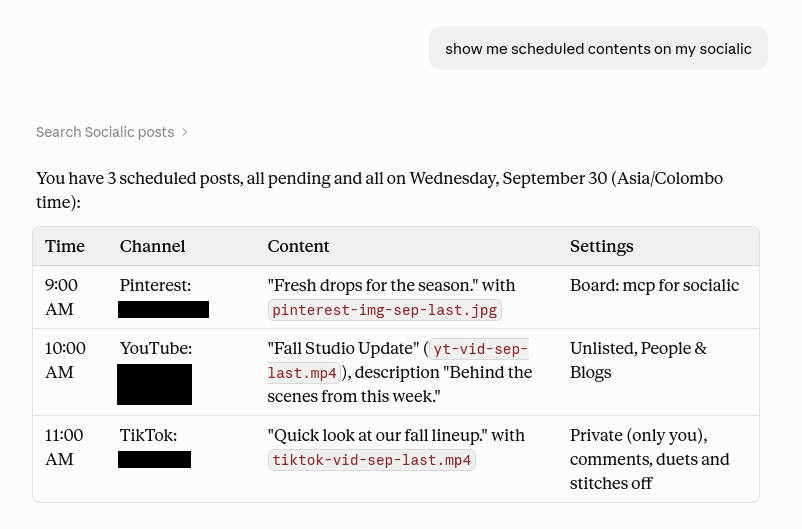
Three platforms, three very different required fields, one table.
Common Issues
“YouTube posts require a category” keeps coming up
This isn’t a bug — YouTube has no default category or visibility through its own API, so Socialic MCP can’t invent one either. Answer both in your next message and the same request goes through.A TikTok privacy level gets rejected
TikTok controls which privacy levels your specific account can use, not Socialic MCP. Ask it to list your channels to see the current allowed set before picking one.Pinterest says a board is required
Name an existing board in the same request. Socialic MCP doesn’t create boards on your behalf — if the one you want doesn’t exist yet, create it in Pinterest first.TikTok flags a post as needing commercial disclosure
This happens once you’ve indicated the content is promotional. Tell Claude whether it’s promoting your own brand, a third party’s, or both, and it’ll set the right flags before scheduling.Frequently Asked Questions
Why are YouTube, TikTok, Pinterest, and LinkedIn grouped in one guide?
Not because they connect the same way — they don’t. It’s because each one (except LinkedIn) adds a required field the Meta platforms never ask for: a category and visibility for YouTube, a privacy level for TikTok, a board for Pinterest. This guide is about handling those, one at a time.Does every YouTube post need a category and a visibility?
Yes, on every request, with no default. socialic_schedule_post rejects a YouTube post that’s missing either one and returns the list of valid categories and the three visibility options (PUBLIC, UNLISTED, PRIVATE) so you can answer in one follow-up.Can I choose any TikTok privacy level I want?
No — only whatever your connected TikTok account actually allows, which Socialic MCP reads from your account settings. Ask it to list your channels first if you’re not sure what your account permits.What counts as branded content on TikTok?
Content that promotes your own brand or a third party’s, per TikTok’s disclosure policy. If you flag a post that way, Socialic MCP requires you to also say whether it’s your own brand, someone else’s, or both, via the yourBrand and brandedContent fields.Does Pinterest require a board every time?
Yes. A board is a required field for every Pinterest post through Socialic MCP, the same as it is in the Pinterest app itself — there’s no “default board” fallback.What happens if I don’t attach media for YouTube, TikTok, or Pinterest?
The request is rejected before anything is sent. All three require media on every post — YouTube and TikTok need video (TikTok also accepts up to 5 images instead), Pinterest needs one image or one video. Only LinkedIn in this group treats media as optional.Is LinkedIn as strict as the other three?
No — it’s the most relaxed platform in this guide. Media is optional, up to 9 images or videos, and there’s no required field like a category or a board. It behaves close to how Facebook does in the Meta group.Final Thought
Four platforms, four different personalities: YouTube wants a category and a visibility, TikTok wants a privacy level it actually supports, Pinterest wants a board, and LinkedIn barely wants anything at all. Socialic MCP already knows which is which — the only thing that changes on your end is which follow-up question you might get asked.
Don’t have Socialic yet? Start free
and connect your first channel.
Keep Reading
New to Socialic MCP? What is Socialic MCP? and how to connect it cover the setup this guide assumes.
Posting to the Meta platforms instead? See how to schedule a Meta post with Socialic MCP. For every tool and shortcut with full sample exchanges, see what Socialic MCP can actually do.