
The Ultimate Social Media Content Calendar Template for 2026
Here is the honest truth about social media in 2026. The creators and brands that show up consistently are the ones that grow. Not the ones with the biggest budgets, the fanciest cameras, or the most viral one-hit posts. The ones with a plan.
But “be consistent” is easy advice to give and surprisingly hard advice to follow. You sit down on a Monday morning, open Instagram, and realize you have no idea what to post. So you scramble, throw something together, and promise yourself you will plan ahead next week. Next week comes and the same thing happens again.
A content calendar fixes that problem at the root. It is not a fancy spreadsheet or a complicated system. It is simply a plan that tells you what to post, where to post it, and when. That is it. And once you have one, the daily panic of “what should I post today?” just disappears.
In this guide, we will walk through exactly how to build a social media content calendar from scratch, and then show you how
Socialic
makes the entire process faster by letting you schedule and publish everything from one place.
Why a Content Calendar Is Non-Negotiable in 2026
A few years ago, you could get away with posting whenever inspiration struck. Algorithms were more forgiving, there was less competition, and organic reach was still generous. That world is gone.
In 2026, every major platform rewards consistency. Instagram’s algorithm favors accounts that post on a regular cadence. LinkedIn actively deprioritizes profiles that go silent for weeks and then dump three posts in a day. TikTok’s For You Page algorithm looks at your posting history to decide how much reach to give your next video. YouTube Shorts performs better when you publish at predictable intervals.
Beyond the algorithms, there is a practical human reason too. Without a calendar, content creation becomes reactive instead of intentional. You end up posting whatever feels easy in the moment instead of building toward a larger message. A content calendar turns scattered posting into a real strategy.
Here is what a good content calendar does for you:
Eliminates decision fatigue. You decide once what to post for the entire week or month, instead of deciding seven times a week under pressure.
Keeps your content balanced. Without a plan, most people default to one type of post over and over. A calendar lets you deliberately mix educational content, personal stories, promotional posts, and engagement-driven content.
Makes batching possible. When you know what is coming up, you can sit down once and create three, five, or even ten pieces of content in a single session. Batching is the single biggest time-saver in content creation.
Helps you stay seasonal and relevant. Holidays, product launches, trending topics, and industry events are easy to plan around when you can see the whole month at a glance.
Lets teams collaborate without chaos. If more than one person is involved in your social media, a shared calendar is the only way to avoid duplicate posts, missed deadlines, and conflicting messages.
Step 1: Define Your Content Pillars
Before you fill in any dates, you need to answer one question: what topics does your brand actually talk about?
Content pillars are three to five broad themes that everything you post falls under. They keep your feed focused and give your audience a reason to follow you instead of someone else. Without pillars, your feed becomes a random collection of posts with no clear identity.
Here are examples of content pillars for different types of accounts:
For a fitness coach: Workout tutorials, nutrition tips, client transformations, mindset and motivation, behind-the-scenes of coaching life.
For an e-commerce brand: Product highlights, customer reviews, how-it-is-made stories, lifestyle content showing the product in use, limited-time offers.
For a SaaS company like
Socialic
:
Product tips and tutorials, social media strategy advice, customer success stories, industry news and trends, team culture.
Pick three to five pillars that feel natural for your brand. Write them down. Every piece of content you create from this point on should fall under one of those pillars. If it does not fit any of them, it probably does not belong on your feed.
Need help narrowing down your pillars or generating ideas for each one? See our full guide to social media content pillars for a step-by-step framework, ten account examples, and techniques for turning each pillar into dozens of post ideas.
Step 2: Decide Your Posting Frequency by Platform
One of the biggest mistakes people make is trying to post everywhere, every day, right from the start. That is a fast track to burnout. Instead, choose a frequency you can actually maintain for three months straight. Consistency beats volume every single time.
Here are general guidelines based on what is working in 2026. These are not hard rules, but they give you a realistic starting point.
Instagram (Feed + Reels): 3 to 5 times per week. Mix static posts, carousels, and Reels. Carousels are currently outperforming single images in almost every niche.
TikTok: 3 to 7 times per week. More is generally better on TikTok, but quality matters more than it did in 2023. One strong video beats three mediocre ones.
LinkedIn: 2 to 4 times per week. Text posts and document carousels still perform well. Avoid weekends unless your audience is active then.
Facebook: 3 to 5 times per week. Facebook groups remain underrated for organic reach in 2026.
YouTube (Shorts + Long-form): 1 to 2 long-form videos per week, plus 3 to 5 Shorts if you are repurposing.
Pinterest: 3 to 10 pins per week. Pinterest is still a search engine at heart, so keyword-rich descriptions matter more than timing.
Threads: 3 to 5 times per week. The platform is still growing, and early consistent posters are getting outsized reach.
Pick two or three platforms to start. Do not try to be everywhere at once. Once you have a rhythm on your core platforms, you can expand.
Step 3: Build Your Calendar Structure
A content calendar does not need to be complicated. At its core, it is just a grid with the following columns:
Date and time (including timezone)
Platform (Instagram, TikTok, LinkedIn, etc.)
Content pillar (which of your 3-5 themes does this fall under?)
Post type (Reel, carousel, static image, text post, Story, Short, Pin)
- Caption or copy
Media (image, video, or graphic, with file name or link)
- Hashtags
Status (idea, drafted, approved, scheduled, published)
You can build this in a spreadsheet, a Notion database, or a project management tool. But the most effective approach, and the one that actually saves you time, is using a tool that combines the calendar with the scheduling. That way you are not planning in one place and then copying everything into another tool to actually publish it.
Step 4: Fill In a Sample Week (Here Is One You Can Copy)
To make this concrete, here is what a sample week might look like for a small business posting on Instagram, LinkedIn, and TikTok. You can adapt this to your own pillars and platforms.
Monday
Instagram Carousel: “5 Mistakes Killing Your Engagement in 2026” (Educational pillar). Post at 11 AM in your audience’s timezone.
Tuesday
LinkedIn Text Post: A short personal story about a lesson you learned in your business this month (Personal/storytelling pillar). Post at 8 AM.
TikTok Video: Quick 30-second tip related to your niche (Educational pillar). Post at 6 PM.
Wednesday
Instagram Reel: Behind-the-scenes of how you create content or run your business (Behind-the-scenes pillar). Post at 12 PM.
Thursday
LinkedIn Carousel: “How We Grew Our Engagement by 40% in 3 Months” with a data-driven breakdown (Case study pillar). Post at 9 AM.
TikTok Video: Trending audio with a niche-relevant twist (Engagement pillar). Post at 7 PM.
Friday
Instagram Static Post: Customer testimonial or product showcase (Promotional pillar). Post at 4 PM.
Saturday
TikTok Video: Casual, personality-driven content like a day-in-the-life or a relatable moment (Personal pillar). Post at 10 AM.
Notice how the week mixes pillar types and platform formats so the feed never feels repetitive. This is what a content calendar gives you: the ability to see the balance before you publish.
How to Bring Your Content Calendar to Life with
Socialic
Planning content in a spreadsheet is a great start. But the gap between “planned” and “published” is where most people lose time, energy, and momentum. You finish your calendar, and then you still have to open each platform individually, upload the images, paste the captions, set the timing, and hit publish. For every single post. On every single platform.
That is exactly the problem
Socialic
was built to solve. Once your content is planned,
Socialic
lets you schedule and publish it across Facebook, Instagram, LinkedIn, TikTok, YouTube, Pinterest, and Threads from a single dashboard. No switching between apps. No copy-pasting captions into seven different tabs.
Here is how it works.The one-time setup step is connecting your social accounts, covered in how to connect your social media accounts to a scheduler. After that, everything below happens from one dashboard.
The Content Creator: Schedule Posts One by One
Socialic
‘s Content Creator is where you build individual posts. Think of it as your publishing control panel. You open a single form, and from there you can do everything you need for one post across multiple platforms at once.
Here is what you can do inside the Content Creator:
Choose your platforms. Select one or multiple channels for the same post. If you want one piece of content to go out on Instagram, LinkedIn, and Threads at the same time, you can set that up in a single step.
Upload your media. Add images, videos, or graphics directly.
Socialic
handles the different format requirements for each platform behind the scenes.
Set thumbnails. For video-heavy platforms like YouTube and TikTok, you can upload a custom thumbnail so your content looks polished in the feed before anyone clicks play.
Write your captions. Each platform has its own caption field, so you can customize the message for each audience. The LinkedIn version of your caption might be longer and more professional, while the TikTok version might be shorter and more casual. You do not have to use the same text everywhere — Socialic’s free Caption Character Counter can tell you where each version gets cut off before you publish.
Fill in platform-specific fields. Different channels have different requirements. YouTube needs a video title and tags. Pinterest needs a board and a destination link. LinkedIn might need a document attachment for a carousel.
Socialic
surfaces the right fields for each platform automatically, so you never miss anything.
Pick your timezone, date, and time. Schedule the post to go live exactly when your audience is most active, in the timezone that matches your audience, not yours. If your followers are in New York but you are in Colombo, you set the post for 11 AM Eastern and
Socialic
handles the conversion.
Socialic’s Content Creator: pick your platforms, upload your media, and schedule it all in one step.
The whole experience takes about two minutes per post. Compare that to logging into seven different platforms, uploading the same image seven times, and adjusting captions in seven different editors. Over the course of a month, you save hours.
The Bulk Creator: Schedule an Entire Month in Minutes
This is where things get really interesting, and where a content calendar becomes genuinely powerful instead of just organized.
Socialic
‘s Bulk Creator lets you take your content calendar and turn it into scheduled posts in one upload. The process is simple:
- Download the Excel template.
Socialic
provides a pre-formatted Excel sheet with all the columns you need: platform, caption, media file references, date, time, timezone, and any platform-specific fields.
Fill it in with your planned content. If you have already mapped out your calendar using the structure above, you already have most of this information. Just copy your planned posts into the
Socialic
template, row by row.
Upload the completed sheet. Go to the Bulk Creator in
Socialic
, upload your filled-in Excel file, and
Socialic
will create and schedule all the posts automatically.
That is it. Thirty posts across seven platforms, scheduled for the entire month, in a single upload.
The Bulk Creator is especially useful for teams and agencies managing multiple clients. Instead of building each post one at a time inside a dashboard, you can plan everything in a spreadsheet where your team already works, get approvals in whatever workflow you already use, and then push the entire batch live in one step.
It is also the best way to put content batching into practice. Spend one afternoon creating all your content for the month, fill in the template, upload it to
Socialic
, and then you are free to focus on engagement, strategy, and actually running your business for the rest of the month.
How to Batch Create Content Using Your Calendar
A content calendar is the plan. Batching is the execution method that makes the plan sustainable.
Content batching means creating multiple pieces of content in a single focused session instead of making one post at a time throughout the week. It works because your brain does not have to context-switch. Writing five captions back-to-back is faster than writing one caption on five different days, because you stay in “writing mode” the whole time.
For the full walkthrough, including an hour-by-hour batch day schedule, see how to batch create a month of social media content in one day.
Here is a simple batching workflow that works well with a content calendar:
Day 1: Plan. Fill in your content calendar for the next two to four weeks. Assign content pillars, platforms, and post types to each slot. Do not write anything yet.
Day 2: Write. Sit down and write all the captions, hooks, and text content in one session. Reference your calendar so you know exactly what each post needs to say.
Day 3: Create visuals. Design or film all the images, graphics, and videos your posts need. Batch similar formats together so you can stay in one tool at a time.
Day 4: Schedule. Upload everything to
Socialic
using the Content Creator for individual posts or the Bulk Creator for the entire batch at once.
Four sessions. That is all it takes to have two to four weeks of content ready to go. And with
Socialic
‘s Bulk Creator, the scheduling step itself takes minutes instead of hours.
5 Common Content Calendar Mistakes (And How to Avoid Them)
- Planning too far ahead with too much detail
A three-month calendar with every caption pre-written sounds impressive, but it breaks the first time a trend pops up or your priorities shift. Plan the themes and pillars a month out, but keep the actual captions and creatives to a two-week window so you can stay flexible.
- Posting the same content on every platform without adapting it
Cross-posting saves time, but copying the exact same caption from LinkedIn to TikTok feels lazy and performs poorly. Each platform has a different tone and audience expectation. When you schedule in
Socialic
, use the separate caption fields per platform to customize the message even slightly. A small tweak goes a long way.
- Only posting promotional content
If your calendar is just “product launch, sale, product feature, sale” your audience will tune out. A good rule of thumb is 80/20: eighty percent value-driven content (educational, entertaining, inspiring) and twenty percent promotional. Your content pillars should naturally enforce this balance.
- Ignoring analytics after publishing
A content calendar is not a “set it and forget it” document. At the end of each month, look at which posts performed best and which fell flat. Double down on what works. Drop what does not. Your calendar should evolve every month based on real data, not just your gut feeling. If a post’s job is to send people to your site, tag its link with Socialic’s free UTM Link Builder first — otherwise “analytics” for that post is just guesswork.
- Choosing too many platforms at once
Being on seven platforms sounds like good coverage, but if you are a team of one, it is a recipe for burnout. Start with two or three where your audience already is. Nail those. Then expand.
Socialic
supports Facebook, Instagram, LinkedIn, TikTok, YouTube, Pinterest, and Threads, so when you are ready to scale to new platforms, the tool already supports it. You do not have to switch to a different scheduler.
Content Calendar Tips Specific to 2026
The social media landscape changes fast, and strategies that worked two years ago may not work now. Here are a few things worth keeping in mind as you build your calendar for the rest of this year.
Short-form video is still dominant, but carousels are catching up.
On Instagram in particular, carousel posts are getting more reach than single-image posts in 2026. Make sure your calendar includes a healthy mix of both video and carousel content, not just one or the other.
AI-generated content is everywhere, and audiences can tell.
Use AI tools to brainstorm and draft, but always add your own voice, experiences, and opinions before publishing. The posts that perform best are the ones that feel genuinely human.
Threads is a real platform now. If your audience is on Instagram, they are likely on Threads too. It is still early enough that consistent posting gets disproportionate reach. Add it to your calendar and treat it like a fast, text-first extension of your Instagram presence.
Repurposing is not lazy, it is smart. One blog post can become an Instagram carousel, a LinkedIn article, a TikTok voiceover, a Pinterest infographic, and three Threads posts. Build your calendar around one core content piece per week, and then map out the repurposed versions for each platform.
Timezones matter more than ever. With global audiences, posting at “9 AM” means nothing if you do not specify whose 9 AM. When you schedule in
Socialic
, you set the timezone explicitly so the post goes live at the right moment for the right audience, regardless of where you physically are.
Putting It All Together
Let us recap the full workflow from zero to a month of scheduled content:
Define your 3 to 5 content pillars.
Choose your platforms and set a realistic posting frequency for each one.
Build your calendar using the structure above, in a spreadsheet, Notion, or your tool of choice.
Fill in the calendar for the month, assigning a pillar, post type, and platform to each slot.
Batch-create your captions, visuals, and videos over two to three focused sessions.
Upload everything to
Socialic
using the Content Creator for individual posts, or the Bulk Creator for the full batch.
Set your timezones, dates, and times for each post.
Let
Socialic
handle the publishing across all your platforms.
Review your analytics at the end of the month and refine next month’s calendar based on what worked.
That is the entire system. No complicated workflows, no expensive agency retainers, no spending your evenings manually posting to six apps.
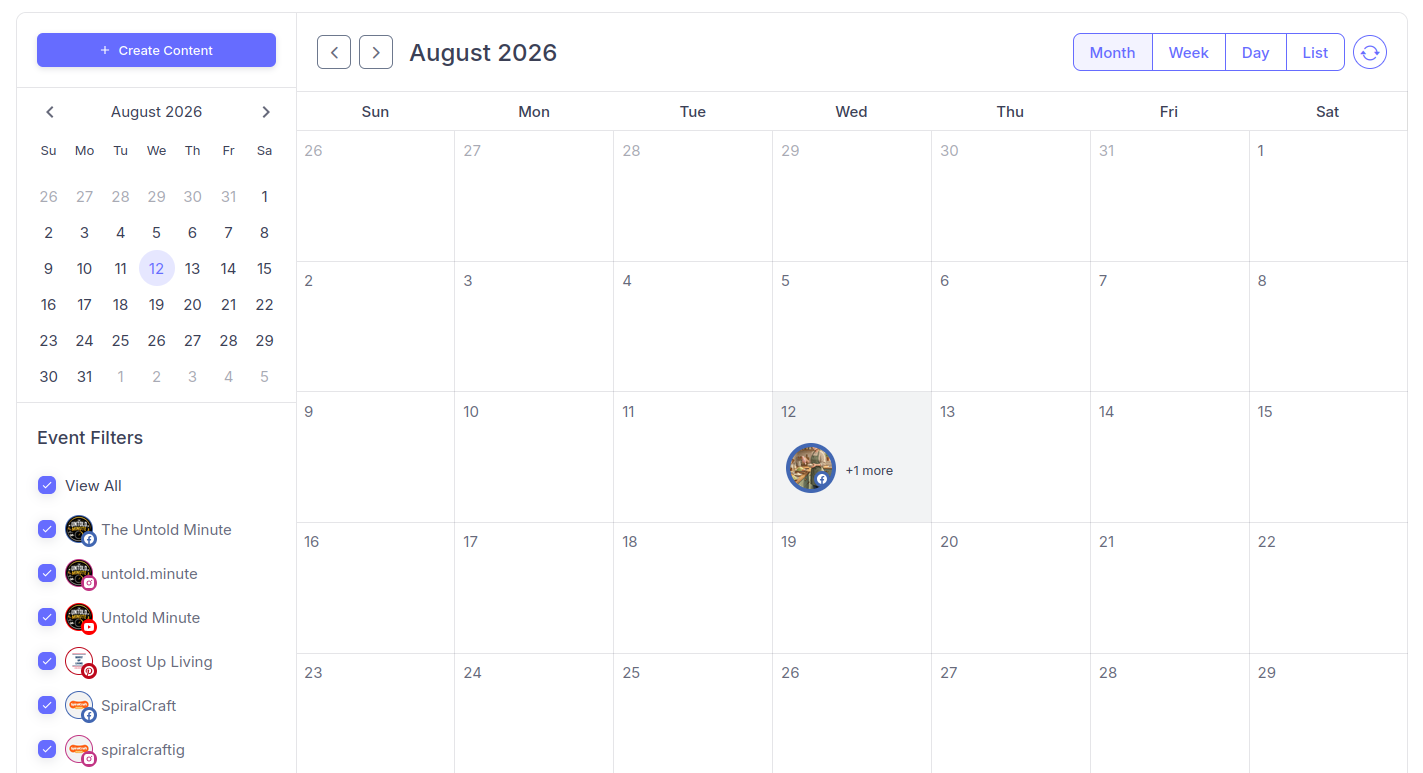
A full month, planned and scheduled, all in one calendar view inside Socialic.
Final Thought
A content calendar is not about being perfectly organized. It is about removing the daily friction that stops you from posting consistently. The creators and brands who win on social media in 2026 are not the ones with the most creative ideas or the biggest budgets. They are the ones who show up regularly with good content, week after week, without burning out.
The calendar gives you the plan.
Socialic
gives you the fastest way to execute it.
Start planning. Start scheduling. And stop scrambling every morning wondering what to post.
Try Socialic free
and schedule your first month of content today.
Keep Reading
Once your calendar is planned, the next step is publishing it without losing hours to manual work. See
how Socialic helps content creators publish smarter and grow faster
for a closer look at the tools that turn this calendar into scheduled posts.